KonaKart is completely multi-lingual both at the database level and at the UI level.
The data within the database such as product descriptions and category names etc. may exist in different languages. The database contains a languages table that contains information about each of the supported languages. When a new product is added to the database through the administration tool, it is possible to enter a description in multiple languages.
Languages in the database have an attribute (specifically a column called display_only that indicates whether the language is only used for display purposes and not for product descriptions (and other KonaKart objects that have different variants for each data type). By default when you install KonaKart every language that is defined in the database has this display_only attribute set to 0 (false) which means that all KonaKart objects that require a variant for each language must have a value defined for each language.
If you wish to introduce a language for use with the Admin App but not be required to add KonaKart object definitions for the language you can check the Display Only checkbox for the language (this can be found on the Languages Panel of the Admin App). You will have to provide a message catalog file for the new language and name the file in the appropriate fashion for the chosen locale.
With KonaKart you can either store the application messages in message catalog files on disk or in the database. The default is to use message catalog files but from the v5.2.0.0 release it became possible to use the database to store these messages. Some users prefer to manage the messages in the database whereas others prefer files. The choice is yours!
A configuration parameter called "USE_DB_FOR_MESSAGES" is used by the system to determine whether the messages are stored in the database or in files. You can set this value in the Admin Application under Configuration >> Admin App Configuration. The label used in English for this field is "Use D/B For Messages" and it can have a value of "true" or "false".
When the messages (the storefront Application messages, the Admin Application messages and the Admin Application Help messages) are stored in the database you should use the Messages panel of the Admin Application to maintain the messages.
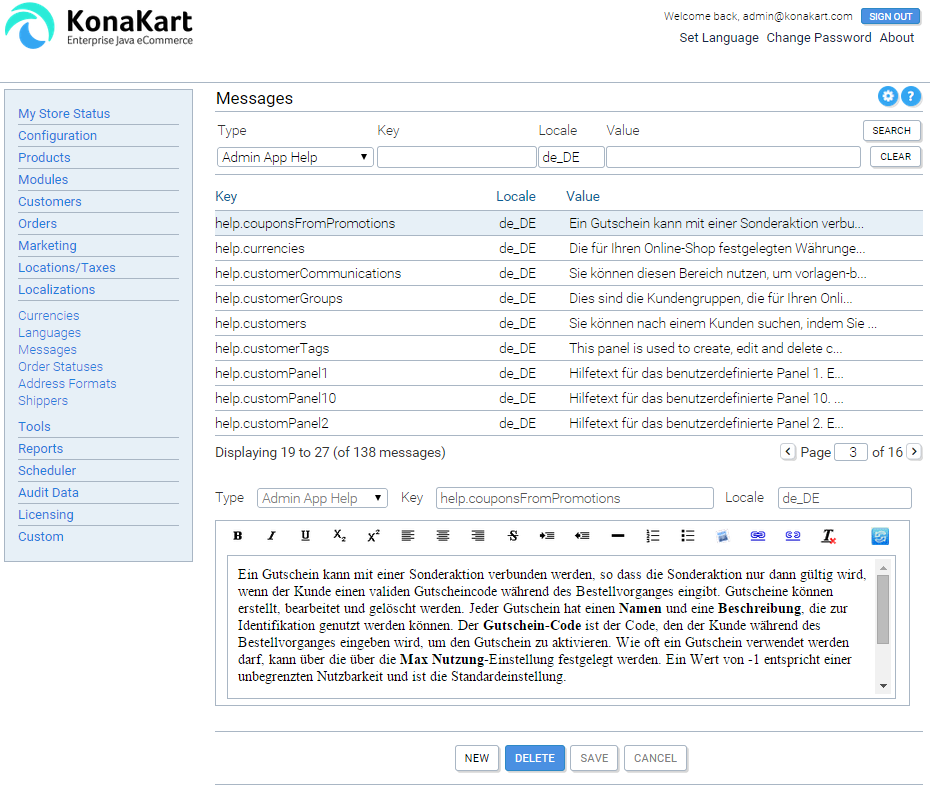
KonaKart Admin Application - Messages Panel
Note that when editing the messages using the Messages Panel of the Admin Application you can click on the "Switch Editor" icon (to the right of the "Locale" field) to switch between the Rich Text Editor and the Plain Text Editor. This is sometimes useful to gain greater control over the HTML that is saved (the HTML that is created by the Rich Text Editor can be slightly different depending on which browser you use).
When the messages are stored in message catalog files, there is a message catalog for each language. These can be found in the webapps/konakart/WEB-INF/classes directory of the application server. The default message catalog is called Messages.properties and is used if the language specific catalog isn't found.
The naming convention of the message catalogs is as follows:
// contains all the storefront strings
Messages_[language-code].properties
For [language_code] you should use the 2-character language code that you have set up in the languages section of the admin application. For example, you might have "fr" for French, "zh" for Chinese, "de" for German, "ja" for Japanese etc. You can also use the full locale if you prefer (such as "en_UK", "es_ES", "pt_BR" etc).
In order to change the language of the storefront application the current customer clicks a link which runs the code in SetLocaleAction.java
The KonaKart database allows for only one definition of a country name. In some cases (where only one language is used for the store) this is sufficient and no translation of these names is required. In cases where it's required to show the country names in the language of the supported locales you need to follow the following instructions.
You can display a list of countries (for example for display on the customer registration form) in the language of the currently-selected locale by taking the following steps:
Set the translated country names in the message catalog for each supported locale (or set these values in the database if you use the database for your messages). The key to use is defined for each country in the countries table of the database (as an example, the default key for the "United States" is "CTRY.USA").
Enable the lookup of the translated messages by setting the Use Country Names in Msg Cat configuration variable to true. (The configuration variable key is USE_MSG_CAT_FOR_COUNTRY_NAMES ). You can find this configuration setting on the Configuration >> Store Configuration tab of the Admin Application.
Once set up you can use a call on the KonaKart Application Client Engine (KKAppEng) called getAllCountries() to get a list of countries with the translated names. The list of country names returned is ordered according to the collation rules of the selected locale. You can see examples of the use of this call in the RegisterCustomerBody.jsp source file provided in the download kits.
The KonaKart Administration Application can be completely translated by either editing the messages in two message catalog files (for file-based messages) or by editing the messages stored in the database using the Admin Application itself.
To make the Admin Application available in a new language you need to supply two new message catalog files (for file-based messages) or simply add a complete set of database records for the new language (when KonaKart is configured for database-based messages).
Whichever language you use this is also a handy way to re-label the "custom" fields that appear on many of the important objects within KonaKart to reflect the meaning in your particular system.
In the case of file-based messages, your new message catalogs must be called:
// contains all the strings except the help page text
AdminMessages_[language-code].properties

// contains just the text on the help pages
AdminHelpMessages_[language-code].properties
For [language_code] you should use the 2-character language code that you have set up in the languages section of the admin application. For example, you might have "fr" for French, "zh" for Chinese, "de" for German, "ja" for Japanese etc. You can also use the full locale if you prefer (such as "en_UK", "es_ES", "pt_BR" etc).
For file-based messages you should place your completed message catalogs in this directory:
webapps/konakartadmin/WEB-INF/classes
Since there are quite a large number of messages to translate, you might choose to do this over a period of time. A recommended approach is to start your new message catalogs with copies of the default (English) catalogs (called AdminMessages.properties and AdminHelpMessages.properties) then translate the messages that are most important to you first and complete the rest as time permits.
You can use a "substitution" syntax in AdminHelpMessages.properties if you wish to create messages that are too large for the database to store (4000 bytes in Oracle and DB2). The substitution syntax is like the UNIX shell variable format: ${variable}. An example of the technique is provided for the help.editProductDetails property in AdminHelpMessages.properties where it is defined as the concatenation of two other properties (help.editProductDetails_1 and help.editProductDetails_2) that are also declared in AdminHelpMessages.properties.
There are also a number of strings in the database that need to be translated. These are used by the Admin App to label some of the configuration parameters and provide helpful comments. If you issue a: "SELECT configuration_title, configuration_description FROM configuration;" SQL query, you will see the values that you can update.
Also, you may wish to include translations for the velocity templates (eg. EmailNewPassword, OrderDetails, OrderInvoice, OrderPackingList and OrderStatusChange).
Once you have completed the message catalogs, velocity templates and a sql update script for your language, please contribute these to the KonaKart Community by posting them to the contributions section of our forum for the benefit of other users.